
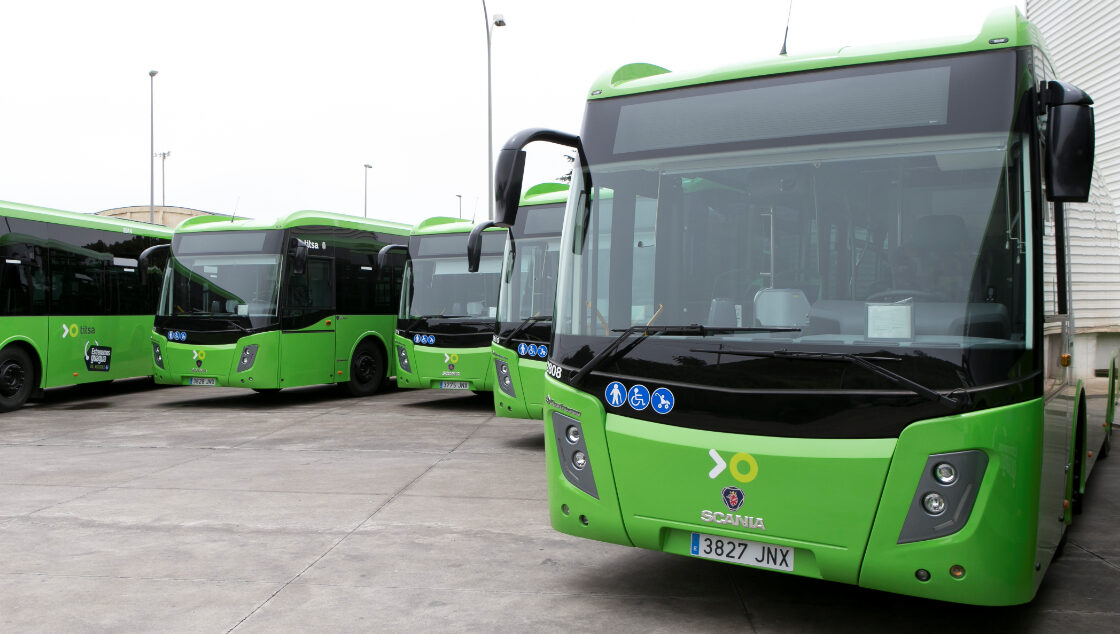
You can explore a surprising amount of Tenerife by public bus from Puerto de la Cruz. The green TITSA buses, called guaguas in the Canary Islands, connect the town with nearby La Orotava, the northern coast, Santa Cruz, the airports and some longer day-trip destinations. Start with the destination and the return journey, then choose a line and a way to pay. This guide explains the process without making you memorise a timetable.
The simple way to plan a bus trip
For most visitors, Estación de Puerto de la Cruz is the clearest place to begin. Find the line for your destination, check the direction shown on the bus, and look at the timetable for your actual travel day. Weekday, weekend and public-holiday columns can differ. A route number alone is not enough: some trips on the same line have different notes, stops or end points.
Check the return before you leave Puerto. On long trips, especially Teide or the south, the last convenient bus may be much earlier than you expect. Allow time to reach the return stop, identify the correct side of the road or station platform, and account for a change of bus if your trip needs one. TITSA's current line pages and journey planner show the departures and service notices for your travel day.
If you only want a loop around the attractions within town, our separate Puerto de la Cruz tourist bus guide covers the sightseeing service. It has different tickets and a different purpose from the island's TITSA network.
Scanning the codes at bus stops
Some TITSA stops have a coloured NaviLens marker that looks a little like a QR code. To read that coloured marker, download the free NaviLens GO app (for general visitors) or NaviLens (with audio and vibration guidance for visually impaired travellers) before pointing your phone at it. Your ordinary camera's QR scanner is not the right tool for a NaviLens marker. These markers can show information about the stop and approaching buses. Find the two apps on the official NaviLens site.
A standard black-and-white QR code at a stop is different and can usually be opened with your phone's camera. If you do not want to install an app or cannot scan a code, note the stop number and enter it on TITSA's Your next bus page. The stop codes are for information, whereas a ten+ Móvil ticket uses a separate validation process when boarding a bus.
How to read a TITSA route page
Choose the line number, then check the heading that says where the bus is travelling from and where it is going. On many line pages, outward and return directions are switched with a direction control. Read the day type above the table and the column heading above the time: it may show a departure from Puerto, a time passing an intermediate stop, or a departure from the far end. These are not interchangeable.
The route description shows the main places served, while notes below the table may limit a particular journey, stop or day. A bus can pass a place without picking up or setting down passengers there on every trip. Look for the correct stop for your direction, rather than assuming the stop across the road is the return stop. At an ordinary roadside stop, signal clearly as your bus approaches; press the stop button in good time when you want to get off. If a detail is unclear, the Puerto station information desk can help you plan the outward and return legs.
Useful routes from Puerto de la Cruz
These line numbers are route examples, not a printed timetable. Check the current direction, stops and departures before travelling.
- Santa Cruz de Tenerife: line 100 is a direct TF-5 route; line 102 also links Puerto with Santa Cruz, via La Laguna. Choose according to the stop and journey that suit you.
- La Laguna: line 102 goes through the La Laguna interchange on its way between Puerto and Santa Cruz. Line 101 is primarily a La Orotava–La Laguna service, so the old advice to board it in Puerto should not be used as a general instruction.
- La Orotava: line 351 links the Puerto and La Orotava stations via El Botánico. Other lines may also pass through the area, but confirm their stopping rules.
- Icod de los Vinos, Garachico and Buenavista del Norte: line 363 follows the northwest corridor through these towns. This is a good example of a route where you should plan the return before setting off.
- Los Gigantes and Puerto Santiago: line 325 travels west via Icod and Santiago del Teide. It is a long journey, so check both directions and the final stop you need.
- Teide National Park: line 348 goes from Puerto via La Orotava and El Portillo towards Las Cañadas. It has a limited timetable; establish the return bus and the stop you will use before committing to the trip.
- Tenerife North Airport (TFN): line 030 links Puerto and the airport. Line 343 also serves TFN on its longer route.
- Tenerife South Airport (TFS): line 343 links Puerto with both airports and continues towards Costa Adeje. Its departures are limited compared with local services.
The network reaches other towns through connections. For a place not shown here, look up the whole journey, including transfer time, rather than guessing from a line that passes nearby.
How can you pay?
TITSA offers several ways to pay. For occasional journeys, you can buy a single ticket on the bus with cash or an accepted bank card. TITSA states that bank-card payment is available across its lines, subject to its card requirements; have a backup method if your phone, watch or card does not work. The price depends on the route and distance.
For several journeys, the rechargeable physical ten+ wallet card can be useful. You load money onto it and use the balance for eligible bus or tram journeys. Unlike an individual travel pass, the wallet can be used by several people travelling together; tell the driver how many are travelling and where you intend to get off, and follow the driver's instruction at the validator. Keep sufficient balance for the group and any return trip.
For a bus-heavy day or week, TITSA also offers one-day and seven-day tourist travelcards with unlimited eligible bus and tram travel for their validity period. These are individual products, so each traveller needs their own. They can be loaded on a ten+ card or bought through ten+ Móvil; the mobile app also offers some single journeys. Compare the pass with the journeys you actually intend to make. A monthly resident product is a different entitlement with eligibility rules and should not be assumed available to every visitor.
Cards, pass prices, accepted payment methods and conditions can change. Check TITSA's current fare information or ask at the station before buying, particularly if your journey involves several people or a connection.
Using a ten+ card on the bus
A physical ten+ card can be obtained and topped up at participating station sales points and machines; TITSA also lists airport machines and authorised outlets. The wallet balance is for pay-as-you-go travel, while a day or seven-day pass is loaded as a different product. Ask which product has been put on the card, particularly if you are buying for more than one person. The physical card itself has a separate cost from the travel loaded onto it.
When you board, say your destination and, if sharing a wallet card, how many people are travelling. Let the driver set up the journey and tell you when to validate. On services with an exit validator, follow the current instructions for checking out as you leave so the correct journey is recorded. Do not rely on the old post's claim that you never need to check out at the terminus: follow the instructions on the vehicle or ask the driver. Validate again when changing buses as required by the ticket rules. If the card lacks enough credit or a validator fails, speak to the driver rather than assuming the ride is paid for. Keep your ticket or card for the journey.
Useful phrases are “A La Orotava, por favor”, “Dos personas a Garachico” and “¿Dónde sale el bus de vuelta a Puerto de la Cruz?”. A few words and the destination written on your phone can make the first journey easier.
Going to or from the airports
Tenerife North (TFN) has the dedicated 030 connection from Puerto, while the 343 also calls there. For Tenerife South (TFS), the 343 is the direct TITSA route from Puerto via TFN. Check the direction carefully at the airport: the same line also continues towards the south of the island.
For a flight, plan around the complete journey: getting from your accommodation to the Puerto station, the bus departure, time on the road, the walk from the airport stop and the airline's check-in requirements. Review the airport-to-Puerto direction separately for your arrival day. If the direct service does not suit the flight, TITSA's planner can show possible connections; a transfer through another town involves extra time and handling luggage between buses. The published route 343 has comparatively few journeys, so do not assume you can simply turn up for the next one.
Making a day trip work
For a first bus outing, La Orotava is a shorter, simpler choice than crossing the island. Santa Cruz and La Laguna work well if you want a city visit with an obvious station or interchange at each end. The 363 lets you explore northwest towns such as Icod or Garachico; choose one or two stops and check the journey back instead of trying to fit every town into a single day.
Los Gigantes and Teide need more planning. Longer travel leaves less time at the destination, and the return options can be limited. At Teide, mountain weather, walking distance between stops and visitor sites, and the fixed return are especially important. Check the actual 348 timetable, your return stop and any cable-car arrangements independently before leaving. Do not treat a bus to the park as a promise of a cable-car ticket or access to every trail.
If a line is disrupted, check the journey planner, service notices or ask station staff about the best way home.
Practical details for a comfortable journey
At the stop: check both the route number and destination display. Signal to the driver at a roadside stop. At a station, confirm the platform shortly before departure. Keep an eye on the approaching stop and use the bell in time.
Bags and buggies: take luggage you can manage yourself and follow staff directions for a bus with a luggage hold. TITSA has size and safety rules for bags carried into the passenger area. On suitable low-floor buses, a stroller may stay unfolded in a designated space if it is available; wheelchair users have priority for that space. On other vehicles the stroller may need to be folded.
Accessibility: an accessible vehicle on one departure does not mean every journey on a line uses the same type of bus. TITSA timetable notes can identify adapted vehicles, but verify the particular departure and stop in advance if step-free boarding matters. Ask about the whole route, including a connection and return.
Changing services: allow a realistic margin, especially on a long interurban journey. A transfer discount depends on the ticket and its rules; it is not a promise that every change is free. Save the bus number and stop name for your way back.
Follow PuertoDeLaCruz.info in Google
If our Puerto de la Cruz guides are useful to you, you can add PuertoDeLaCruz.info as one of your preferred sources in Google.
Official route tools and apps
For the day you travel, use TITSA's route finder, Your next bus by stop number, fare calculator and service notices. Enter your exact origin and destination, switch direction for the return, and check whether you are travelling on a weekday, weekend or public holiday. The numbered routes above go directly to TITSA's own line pages.
For information on a phone, install the official TITSA app from Google Play or the Apple App Store. For mobile tickets and passes, see the separate ten+ Móvil app. To read the coloured NaviLens markers at stops, use NaviLens GO or NaviLens. You do not need these apps to pay with cash, an accepted bank card or a physical ten+ card.
The bus network is useful for exploring Tenerife at your own pace. Start with one straightforward trip and you will soon recognise the station, validators, route numbers and destination displays. Thanks to Su Biela, whose original community review helped visitors feel more confident using the buses.